
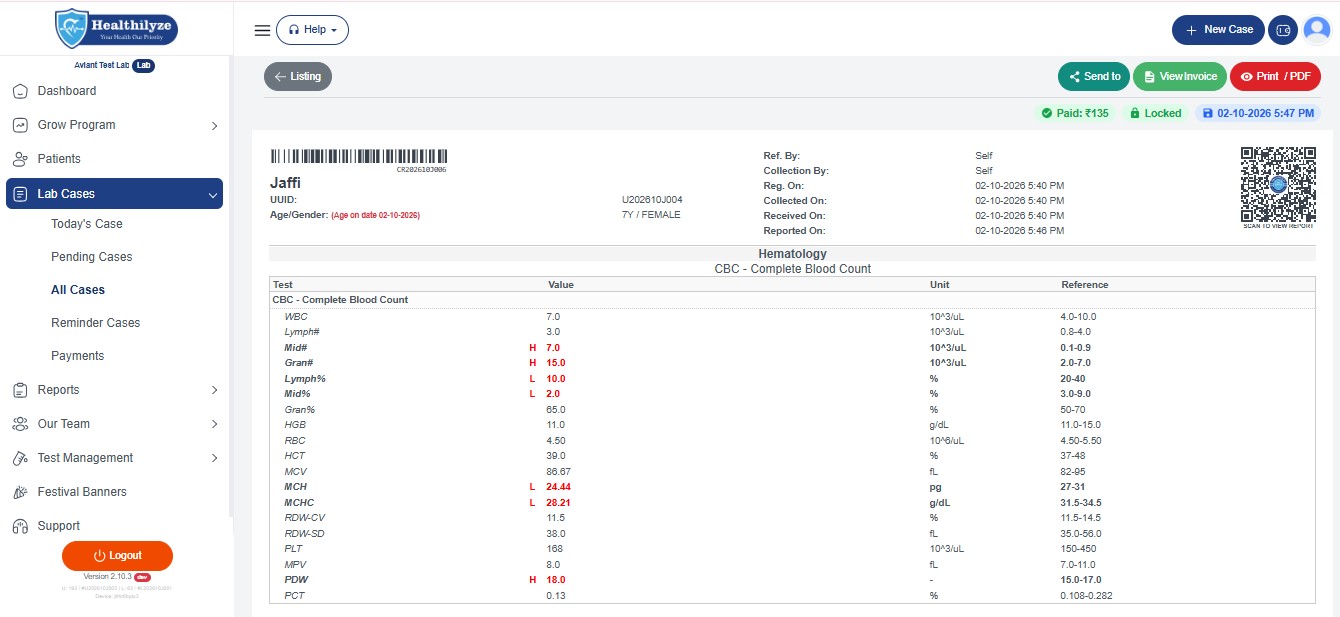
Imagine this: a patient has completed a blood test and is waiting for the report. They call your laboratory to ask, “Is my report ready?” Your staff checks the register, searches for the report, and prepares to send it.
Now imagine a simpler way. The report is ready, your staff opens Healthilyze, and the patient can receive the report through WhatsApp.
No unnecessary trip to the laboratory. No searching through piles of printed papers. Just a more convenient way to share a completed report.
With Healthilyze WhatsApp Report Sharing, diagnostic laboratories can share reports digitally through a link, with PDF sharing available where supported by the workflow.
Let’s understand how it works, step by step.
What Is WhatsApp Report Sharing in Healthilyze?
WhatsApp report sharing is a feature that helps diagnostic laboratories deliver completed patient reports digitally instead of relying only on printed copies.
Healthilyze brings report preparation and sharing into a single laboratory management system. Once a patient’s report is ready, lab staff can use the report-sharing option to send it through WhatsApp.
Depending on the available sharing option, the report can be shared using a link or as a PDF.
A simple example:
Suppose Simran visits a diagnostic laboratory for a CBC test. After the laboratory completes and finalises the report, staff can share it through WhatsApp so Simran can access it on her phone.
That is the convenience of digital report sharing.
Why Do Diagnostic Laboratories Need WhatsApp Report Sharing?
A laboratory’s work does not end when the test is completed. The final report must also reach the right patient.
Here are a few common challenges that digital report sharing can help address.
1. Patients Do Not Always Have Time to Visit Again
Patients may have work, family responsibilities, or long distances to travel.
Example: Aman lives 15 kilometres from the laboratory. Instead of travelling back just to collect a completed report, he can receive it digitally when the lab makes it available.
2. Staff Spend Time Handling Report Requests
When several patients call to ask whether their reports are ready, reception staff can become busy answering the same questions.
A more organised digital reporting process can make report delivery easier to manage.
3. Printed Reports Are Not Always Convenient
Paper reports can be misplaced, damaged, or forgotten at home. A digital copy or accessible report link gives patients another way to retrieve their results.
4. Patients Prefer Simple Communication
Many patients already use WhatsApp every day. Receiving a report through a familiar messaging app can make the collection process more convenient.
How to Share Lab Reports on WhatsApp Using Healthilyze: Step by Step
Follow these steps to understand the typical Healthilyze reporting workflow.
Step 1: Log In to Healthilyze
Open the Healthilyze lab management software and sign in using your authorised account.
From the dashboard, access the option used to manage patient cases.
Example: A receptionist begins the morning shift and opens Healthilyze to manage the day’s patient registrations and reports.
Step 2: Add the Patient’s Case
Select the Add Case option and enter the required patient and test details.
Check that the patient’s name, contact number, and selected tests are correct before saving the case.
Example: Ravi visits for a blood sugar test. The staff member creates his case and records the necessary details.
Step 3: Enter the Test Results
Once the laboratory has completed the required testing, enter the verified results into the appropriate report fields.
Review the values, patient information, and other required details carefully. Reports should be released only after the laboratory’s authorised review process is complete.
Example: The technician enters Ravi’s verified test results and checks the report before it is finalised.
Step 4: Save and Lock the Report
After reviewing the report, use Healthilyze’s Save & Lock workflow to finalise the case as supported by the software.
This step helps prepare the completed report for printing or sharing.
Remember: Always verify the report before finalising it. A digital report should be just as carefully checked as a printed one.
Step 5: Choose the WhatsApp Sharing Option
Open the completed report and select the available report-sharing option.
Healthilyze supports sending reports through WhatsApp using a link. PDF sharing can be used where available in the report-sharing workflow.
Check the recipient’s phone number before proceeding.
Example: Ravi has provided his WhatsApp number and agreed to receive his report digitally. The staff member selects the appropriate sharing option.
Step 6: Share the Report Link or PDF
Use the available option to share the report through WhatsApp.
- Report link: Send the report link so the recipient can open it, subject to the link’s access settings.
- PDF report: Share the report as a PDF attachment where the software supports that option.
Keep the accompanying message short and professional.
Example WhatsApp message:
“Hello Ravi, your laboratory report is ready. Please use the report link shared with you to access your report. For assistance, contact our laboratory.”
Step 7: Confirm the Report Has Reached the Right Person
Follow your laboratory’s process for checking that the intended recipient has received the report or can access it.
If a patient cannot open the link, confirm the number and sharing method before trying again.
Example: Ravi replies that he has opened the report successfully. The staff member can now assist the next patient.
Link vs PDF: Which Is More Convenient?
Both methods can help laboratories share reports digitally, but the best option depends on the patient’s needs and the software’s available features.
Sharing Through a Link
A report link lets the recipient open the report using the provided URL. Depending on the system’s settings, the recipient may be able to view or download it.
Best for: Patients who want to access a report through their phone’s browser.
Sharing Through a PDF
A PDF is a document file that can be opened on compatible phones and computers.
Best for: Patients who want a downloadable document that they can save for their records.
Whichever option your lab uses, make sure access to sensitive medical information is appropriately protected.
How WhatsApp Report Sharing Improves the Patient Experience
The value of this feature goes beyond sending a message. It helps make report collection more convenient for patients and more organised for laboratory staff.
- Convenience: Patients can receive reports digitally instead of always collecting a paper copy.
- Less manual handling: Staff can use a digital workflow rather than depending entirely on printed reports.
- Flexible access: Patients can use a compatible phone or computer to access their report.
- A more organised process: Report preparation and sharing can be handled within the lab’s software workflow.
- A paperless option: Digital delivery can reduce the need for some printed copies.
The actual time saved depends on the laboratory’s patient volume and existing process.
Important Tips Before Sending Reports on WhatsApp
Laboratory reports contain confidential health information. Convenience should never come at the expense of patient privacy.
- Confirm the patient’s phone number before sharing a report.
- Obtain and document the appropriate permission for digital report delivery.
- Send reports only to the intended recipient or an appropriately authorised person.
- Avoid posting reports in group chats or sharing them with unrelated contacts.
- Use protected report links and appropriate access controls wherever available.
- Follow your laboratory’s privacy policies and applicable data-protection requirements.
These simple checks can help build patient confidence in your laboratory’s digital services.
Make Laboratory Report Sharing Simpler with Healthilyze
Managing a diagnostic laboratory involves several responsibilities, from registering patients to preparing reports and handling billing. A clear digital workflow can make these everyday tasks easier to organise.
Healthilyze helps laboratories manage patient cases, prepare reports, and share completed reports through WhatsApp. It also provides a print option for laboratories and patients who still need physical copies.
Whether your laboratory serves a small local community or manages a larger patient flow, convenient report sharing can be a useful step towards a more digital laboratory.
Ready to simplify your lab’s reporting process?
Explore Healthilyze and discover how its laboratory management features can help organise your daily operations.
Frequently Asked Questions
1. Can I share lab reports through WhatsApp using Healthilyze?
Yes. Healthilyze supports sharing completed laboratory reports through WhatsApp using a report link.
2. Can patients receive lab reports as PDFs?
PDF sharing is an option where supported by the available workflow. Check your Healthilyze setup for the exact sharing options.
3. Do patients need to visit the laboratory to collect every report?
Not necessarily. When the laboratory has finalised a report and digital sharing is available, the report can be delivered electronically.
4. Is WhatsApp report sharing suitable for small diagnostic laboratories?
It can be useful for laboratories of different sizes because it offers an alternative to relying entirely on printed reports. The best setup depends on the laboratory’s workflow and privacy requirements.
5. What should a laboratory check before sending a report?
The laboratory should verify the patient’s details, confirm the recipient’s number and permission, ensure the report is finalised, and use an appropriate sharing method.
Final Thoughts
A completed laboratory report should reach the right patient without unnecessary confusion or delays. WhatsApp report sharing offers a practical way to make this final step more convenient.
With Healthilyze, laboratories can bring patient-case management, report preparation, and digital sharing into a more organised workflow.
Prepare the report carefully. Share it responsibly. Make the patient experience simpler.
Book a Free Demo of Healthilyze Lab Software
For More Information: www.Healthilyze.com
Follow us on Instagram: https://www.instagram.com/healthilyze/
Check Software Here: https://healthilyze.in/
READ MORE: How to Create an Account on Healthilyze Lab Software
 Previous Post