

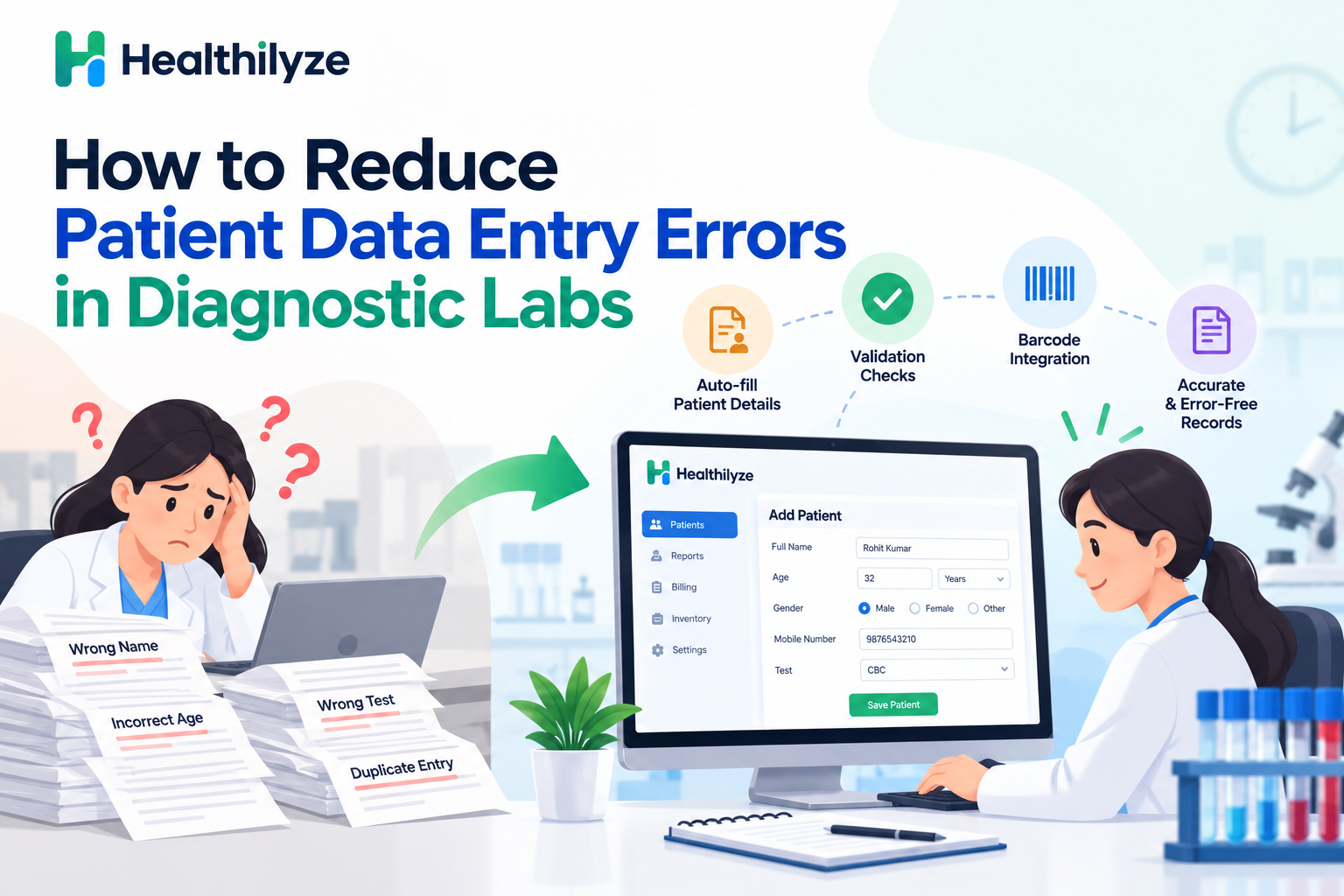
Accurate patient information is an essential part of every diagnostic laboratory. From patient registration to test selection, billing, and report delivery, even a small data entry mistake can create unnecessary delays and confusion.
Diagnostic laboratories handle many types of information every day, including patient names, contact details, test requests, sample identifiers, and medical reports. When these details are entered manually or managed across multiple registers and spreadsheets, mistakes can happen.
The good news is that laboratories can reduce these errors by following consistent procedures, verifying important details, training staff, and using suitable digital lab management software.
In this guide, we will explore common patient data entry errors, why they happen, and practical ways to prevent them in diagnostic laboratories.
What Are Patient Data Entry Errors in Diagnostic Labs?
Patient data entry errors occur when information is recorded incorrectly, entered into the wrong field, duplicated, or associated with the wrong patient or laboratory request.
These errors can occur during registration, test booking, billing, report preparation, or communication with patients.
Common examples include:
- Incorrect spelling of a patient’s name.
- Wrong age, date of birth, or contact number.
- Duplicate patient records.
- Incorrect test selection during registration.
- A mismatch between patient details and sample identification.
- Incorrect information copied into a laboratory report.
- Sending a report notification to the wrong contact number.
Such mistakes may require staff to spend additional time checking records, correcting entries, and communicating with patients.
Why Do Patient Data Entry Errors Occur?
Understanding the causes is the first step toward preventing errors.
1. Manual Record Keeping
Some laboratories depend on handwritten registers, paper forms, or separate spreadsheets to manage patient information. Handwriting may be difficult to read, and information can be missed when staff transfer details from one record to another.
2. Busy Laboratory Reception Areas
During peak hours, reception staff may register several patients within a short period. Rushing through registration can increase the chance of entering incorrect details.
3. Repeated Data Entry
When staff enter the same information into multiple systems, the possibility of inconsistent records increases. A patient’s name or phone number may be correct in one place but incorrect in another.
4. Duplicate Patient Records
Creating a new record for a returning patient without checking existing records can lead to duplicate profiles. This can make it harder to find previous reports and maintain an organized patient history.
5. Insufficient Staff Training
Employees need clear instructions for entering patient details, selecting tests, identifying samples, and reviewing records. Without standardized procedures, different employees may follow different methods.
6. Limited Verification Procedures
When patient information is accepted without confirmation, incorrect details may remain in the system until someone discovers the mistake.
8 Practical Ways to Reduce Patient Data Entry Errors
Step 1: Standardize Patient Registration
Create a consistent registration process that every staff member follows.
At a minimum, collect the information required to identify the patient and process the requested tests. Depending on the laboratory’s workflow, this may include:
- Patient’s full name.
- Date of birth or age, where appropriate.
- Contact information.
- Unique patient or registration ID.
- Requested tests.
- Registration date and other necessary details.
Avoid collecting unnecessary personal information. Use clear field labels and consistent formats to reduce confusion.
Step 2: Verify Patient Details Before Saving
Ask patients to confirm important information, particularly their name and contact details. Where appropriate, verify the information against an existing record or authorized request.
Before finalizing registration, staff should review the entered details for spelling mistakes, missing fields, and obvious inconsistencies.
Practical tip: Make verification a standard step in the registration checklist instead of relying on staff to remember it during busy periods.
Step 3: Use Unique Patient and Sample Identifiers
Names alone are not always sufficient to distinguish patients. Different people may share similar names, and the same patient may visit the laboratory multiple times.
Use unique patient identifiers and appropriate specimen identification procedures. Follow applicable laboratory policies for labeling and verifying specimens, including the required identifiers and collection details.
Patient identity verification and specimen identification should remain separate, documented safety checks. Correct registration details alone do not guarantee that a sample belongs to the right patient.
Step 4: Reduce Repeated Data Entry
Entering the same patient details into different records creates unnecessary work and increases the chance of inconsistency.
A suitable digital lab management system can help organize patient information and link it to the relevant test and reporting workflow.
For example, when a returning patient is located through an appropriate identifier, authorized staff may be able to review the existing record instead of creating an unnecessary duplicate.
Staff should still confirm the patient’s identity and the accuracy of information before using an existing record.
Step 5: Train Staff on Data Accuracy
Technology works best when employees understand how to use it correctly.
Provide staff training on:
- Correct patient registration procedures.
- Selecting the intended laboratory tests.
- Checking patient and specimen identifiers.
- Protecting confidential patient information.
- Identifying and correcting errors through authorized procedures.
- Reporting suspected mismatches or inconsistencies.
Periodic refresher training can help maintain consistent practices across shifts.
Step 6: Use Lab Management Software
Lab management software can help laboratories organize registration, test records, billing, and reporting within a more structured workflow.
Depending on the system’s capabilities, useful features may include:
- Digital patient records.
- Patient history management.
- Test and test-package management.
- Structured report generation.
- User roles and permissions.
- Report status notifications.
- Searchable records.
Healthilyze offers cloud-based diagnostic laboratory management features designed to help labs manage patient information, tests, reports, and billing in a digital workflow.
However, software does not automatically eliminate all errors. Accurate data still depends on correct registration, appropriate verification, trained staff, and suitable quality-control procedures.
Step 7: Review Records Before Report Release
Before a laboratory report is released, authorized personnel should verify that the report is associated with the correct patient and laboratory request.
Depending on the laboratory’s procedures, checks may include patient identifiers, requested tests, specimen details, report values, units, and required authorization.
Laboratory results should be reviewed and authorized by appropriately qualified personnel according to the laboratory’s policies and applicable requirements.
Do not rely solely on automated notifications or software-generated reports as proof that the report is correct.
Step 8: Monitor Errors and Correct Their Causes
When an error occurs, correcting the individual record is only part of the process. The laboratory should also investigate why it happened.
For example:
- Repeated spelling mistakes may indicate unclear registration procedures.
- Duplicate records may indicate inadequate patient searches.
- Incorrect test selections may indicate confusing test names or insufficient training.
- Repeated contact-number errors may indicate that details are not being confirmed.
Maintain appropriate records of errors, corrections, and corrective actions. Review recurring patterns to identify where workflow improvements are needed.
How Does Digital Lab Management Software Help?
Digital systems can support more consistent laboratory workflows by keeping information organized and reducing unnecessary manual work.
Here are some areas where suitable lab management software can help.
Patient History Management
Organized patient records can make it easier for authorized staff to locate previous information and reduce unnecessary duplicate registrations.
Test Management
Structured test lists and test packages can help staff select the intended tests and follow consistent registration procedures.
Report Management
Digital report workflows can help organize report preparation, review, and access. Appropriate verification and authorization procedures must still be followed.
Billing Management
A structured billing workflow can help staff connect invoices and payments with the correct patient records and requested services.
User Roles and Permissions
Role-based access can help limit access to information and functions according to staff responsibilities. Each user should have appropriate permissions, and access should be reviewed periodically.
Cloud-Based Access
Cloud-based systems can allow authorized users to access records from supported devices and locations, depending on the service configuration. Laboratories should assess data protection, backup arrangements, availability, and access controls before selecting a system.
A Simple Daily Checklist for Laboratory Staff
Use this checklist to make patient data verification part of the daily workflow.
- Confirm patient identity during registration.
- Check spelling and essential contact details.
- Search for an existing record before creating a new one.
- Confirm the requested tests.
- Follow specimen labeling and identification procedures.
- Check patient and request details before report release.
- Verify the intended recipient before sending a report or notification.
- Record and investigate errors using the laboratory’s approved procedure.
- Protect patient information from unauthorized access.
How Healthilyze Can Support a More Organized Lab Workflow
Healthilyze is a cloud-based diagnostic lab management solution designed to help laboratories manage key operational activities digitally.
Its relevant features include patient history management, test management, billing management, report management, custom user roles, and report notifications.
By bringing supported activities into an organized workflow, Healthilyze can help laboratories reduce repetitive administrative work and make patient records easier to manage.
Before adopting any system, review the features, access controls, data backup arrangements, and workflow requirements that matter to your laboratory. Staff should continue to follow established patient identification, specimen verification, and report authorization procedures.
To learn more about the platform, visit Healthilyze.
Frequently Asked Questions
1. What are the most common patient data entry errors in diagnostic labs?
Common errors include incorrect names, wrong contact details, duplicate patient records, incorrect test selections, and mismatches between patient information and laboratory requests.
2. How can a laboratory prevent duplicate patient records?
Use a consistent registration procedure, search existing records using suitable identifiers, verify the patient’s identity, and create a new record only when appropriate.
3. Can lab management software eliminate data entry errors?
No. Software can help organize information and reduce repetitive manual work, but errors can still occur. Staff verification, training, quality-control procedures, and appropriate access controls remain important.
4. Why is patient data accuracy important in laboratory reporting?
Accurate identification and record keeping help ensure that test requests, specimens, results, and reports remain associated with the intended patient. Errors can cause delays, confusion, and potential patient safety risks.
5. What should a lab do when it discovers an incorrect patient record?
Follow the laboratory’s approved correction and escalation procedure. Verify the correct information, document the correction, assess whether any specimen or report may have been affected, and notify the appropriate personnel when necessary.
Conclusion
Reducing patient data entry errors requires a combination of consistent registration procedures, trained staff, careful verification, and well-organized records.
Diagnostic laboratories can begin by standardizing patient registration, using unique identifiers, checking records before report release, and reviewing recurring errors. Suitable lab management software can support these efforts by organizing patient history, test management, billing, and reporting.
With the right procedures and digital tools, laboratories can build a more reliable workflow while keeping patient information accurate, organized, and appropriately protected.
Book a Free Demo of Healthilyze Lab Software
For More Information: www.Healthilyze.com
Follow us on Instagram: https://www.instagram.com/healthilyze/
Check Software Here: https://healthilyze.in/
READ MORE: How to Create an Account on Healthilyze Lab Software
 Previous Post
 Next Post