

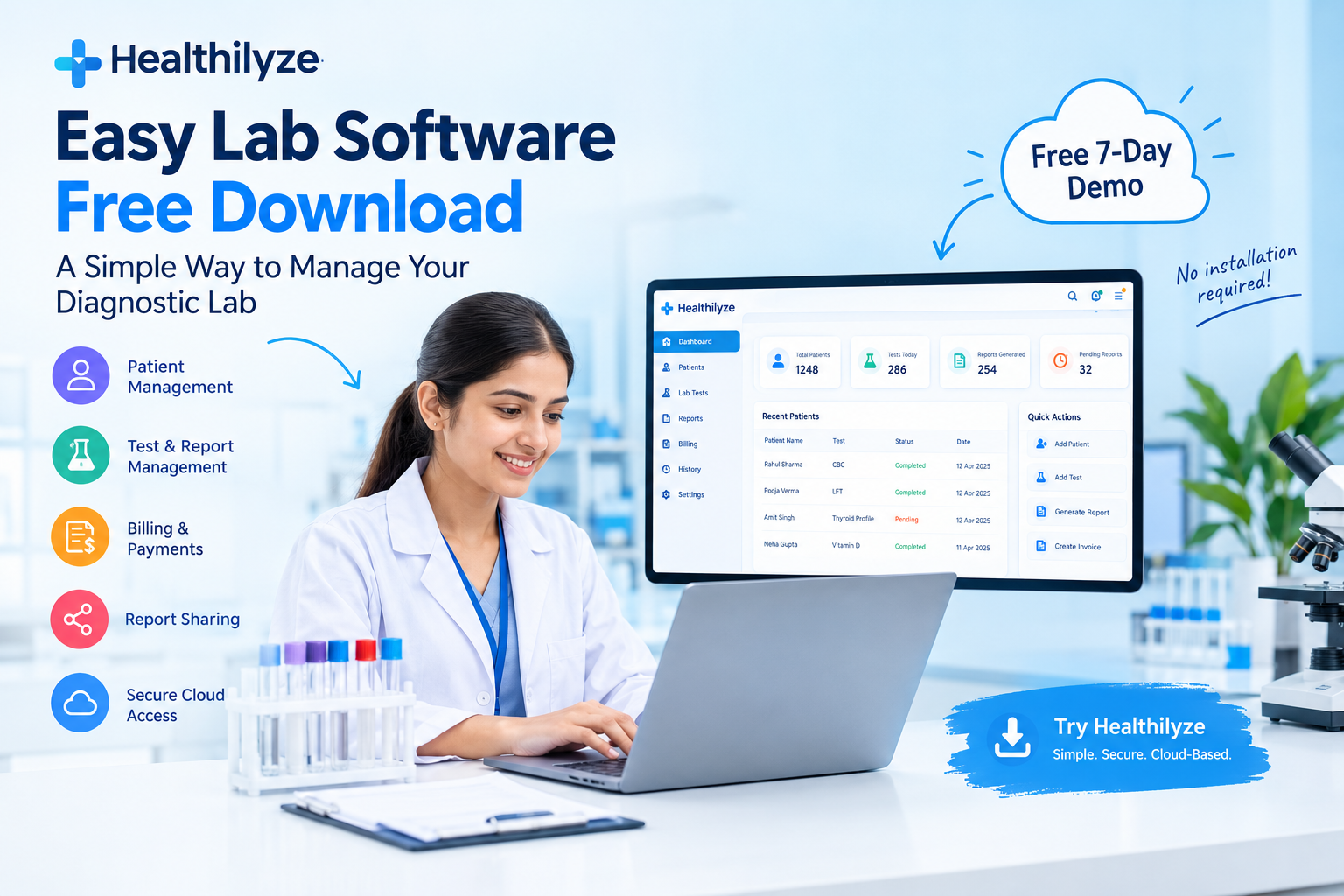
Looking for easy lab software free download options? Discover how modern lab management software can simplify patient registration, laboratory reporting, billing, and report sharing. Learn what to check before downloading any software and how to try Healthilyze with its free 7-day demo.
Is Your Lab Still Managing Everything Manually?
Imagine a busy morning at your diagnostic laboratory. Patients are waiting at the reception, technicians are entering test results, reports need to be printed, and the billing counter is handling multiple payments.
Now imagine managing all these tasks using separate registers, spreadsheets, and files. Even a small mistake can lead to delays, repeated work, or difficulty finding a patient’s previous records.
This is why many laboratory owners search for easy lab software free download solutions. They want an affordable and simple way to digitize daily operations without investing in complicated systems.
The good news is that modern laboratory management software can bring essential activities together in one place. However, before downloading any free software, it is important to understand which features you need, how your data will be stored, and whether the system can support your laboratory as it grows.
What Is Easy Lab Software?
Easy lab software is a digital system designed to help diagnostic and pathology laboratories manage their routine activities more efficiently.
Instead of maintaining separate records for patients, test results, reports, and payments, laboratory staff can use a centralized system to organize their work.
Depending on the software, useful Healthilyze features may include:
- Patient registration and case management
- Laboratory test and test-package management
- Digital report generation and printing
- Billing, invoices, and payment records
- Patient history management
- Online report sharing
- Staff access permissions
- Cloud storage and data backups
For small diagnostic centres, the right software should be easy to learn, affordable to maintain, and suitable for everyday laboratory workflows.
What Should You Check Before Choosing Free Lab Software?
A free download may look attractive, but the real value of software depends on how well it handles your laboratory’s daily requirements.
1. Simple Patient Management
Your staff should be able to register patients, enter case details, and retrieve previous records without navigating complicated menus.
An organized patient management system can reduce repetitive data entry and make routine tasks easier.
2. Accurate Laboratory Reporting
Report generation is one of the most important functions of diagnostic lab software.
Look for options that allow staff to enter test results, prepare reports, review information, and print finalized reports through a clear workflow. Laboratories should maintain appropriate verification and approval procedures before releasing reports.
3. Test Management
A good system should help organize individual tests, test groups, and test packages according to your laboratory’s requirements.
Well-organized test records can make daily reporting more consistent and help staff locate the correct test information quickly.
4. Billing and Payment Management
Managing invoices separately from patient records can create unnecessary work.
Look for integrated billing features that help your team maintain charges, invoices, payment details, and outstanding balances in an organized way.
5. Patient History and Report Access
Patient history can help authorized staff retrieve previous laboratory records when required.
Check how the system searches for historical records, controls access, and protects confidential patient information.
6. Data Backup and Security
Laboratory software stores sensitive patient and business information. Before selecting a free tool, check its backup process, access controls, privacy practices, and recovery options.
Do not assume that a free download automatically provides secure storage or reliable backups.
7. Support and Future Updates
Free software may have limitations in technical support, updates, or advanced features. Understand the provider’s support arrangements and the cost of upgrading before moving your laboratory’s daily operations to a new system.
Discover Healthilyze: Easy Cloud-Based Lab Management Software
If you want to move beyond manual records and simplify daily laboratory operations, Healthilyze offers a cloud-based lab management solution for diagnostic laboratories.
Rather than relying on a traditional software download, you can explore its browser-based workflow and evaluate whether it fits your laboratory’s needs.
Healthilyze brings several important laboratory activities together in one platform.
Key Features of Healthilyze
Patient and Case Management
Organize patient details and laboratory cases in a centralized system, making it easier for staff to manage daily work.
Lab Test, Group, and Package Management
Arrange laboratory tests into individual records, groups, and packages to support an organized reporting workflow.
Digital Report Generation
Enter test results, save and lock completed cases, and prepare reports for printing according to your laboratory’s procedures.
Billing Management
Manage laboratory billing and payment-related activities alongside other operational records.
Patient History Management
Keep previous patient information organized so authorized users can retrieve relevant records when needed.
WhatsApp Report Sharing
Share reports through supported digital workflows, making it convenient to deliver report links to patients.
Cloud Access and Backup Protection
Access the platform through supported devices with an internet connection. Review the provider’s security and backup arrangements to understand how your laboratory’s records are protected.
No Traditional Hardware Installation Required
Healthilyze promotes a cloud-based system that does not require dedicated laboratory software hardware. You should still confirm device compatibility and internet requirements before starting.
How to Get Started with Healthilyze
You do not need to commit to a paid plan before exploring whether a system suits your laboratory.
Follow these simple steps:
Step 1: Visit the official website
Open Healthilyze and explore its laboratory management features.
Step 2: Request the free 7-day demo
Healthilyze lists a free 7-day demo. Use this opportunity to understand the interface and evaluate the available functionality.
Step 3: Test your daily workflow
Check patient registration, test management, report generation, printing, billing, and report sharing. Ask your staff to evaluate the system using appropriate test or demonstration records.
Step 4: Review the available plans
Healthilyze’s website lists a Standard plan at ₹599 per month and an Extended annual plan at ₹5,999 per year. Confirm the current pricing, included features, and applicable terms directly with the provider before purchasing.
Step 5: Choose the right solution
Select a system that fits your patient volume, reporting needs, staff workflow, budget, and data protection requirements.
Is Healthilyze Completely Free?
Healthilyze currently advertises a free 7-day demo, rather than an unlimited free downloadable version of its full software.
The demo allows laboratories to explore the system before deciding whether to purchase a paid plan. If you are specifically searching for an installer that works offline without an internet connection, confirm your requirements with the provider before choosing a cloud-based solution.
Being clear about the difference between a free trial and permanently free software helps you make a more informed decision.
Who Can Benefit from Easy Lab Software?
Easy-to-use laboratory management software may be useful for:
- Small pathology laboratories looking to digitize daily operations
- Diagnostic centres that want more organized patient records
- Laboratories that need a consistent report-generation workflow
- Lab owners who want to manage billing and reports in one system
- Growing laboratories that need better access to historical records
- Teams looking to reduce repetitive paperwork
The most suitable software depends on the size of your laboratory, your reporting processes, and your technical requirements.
Frequently Asked Questions
1. Where can I find easy lab software free download options?
You can explore software providers offering downloadable applications, open-source solutions, or cloud-based systems with free trials. Always download applications from official sources and review their security and system requirements.
2. Is free lab software suitable for a small diagnostic laboratory?
It can be, provided the software supports your essential workflow, protects patient records, offers appropriate backups, and meets your reporting and billing needs. Review any user, report, or feature limits before choosing a free plan.
3. Can I use Healthilyze without installing traditional desktop software?
Healthilyze is promoted as a cloud-based lab management platform that can be accessed through supported devices with an internet connection. Confirm device and browser compatibility with the provider.
4. Does Healthilyze offer a free trial?
Yes. Healthilyze lists a free 7-day demo. Visit its official website to review the current terms and request access.
5. What features should lab software include?
Important features may include patient management, test management, digital reporting, billing, patient history, report printing, controlled user access, data backups, and technical support.
6. Is downloadable software always better than online lab software?
No. Downloadable applications may suit some offline workflows, while cloud-based platforms can offer convenient access across supported devices. Choose according to your internet availability, privacy requirements, workflow, and budget.
Final Thoughts
Searching for easy lab software free download is often the first step toward making a diagnostic laboratory more organized and efficient. But downloading a program is only the beginning. The real objective is to find a system that supports accurate reporting, organized patient records, efficient billing, and responsible data management.
Before choosing any software, compare its features, understand its limitations, and test its workflow wherever a demo is available.
Healthilyze offers a practical starting point for laboratories exploring cloud-based management, digital reports, patient records, and billing in one platform.
Book a Free Demo of Healthilyze Lab Software
For More Information: www.Healthilyze.com
Follow us on Instagram: https://www.instagram.com/healthilyze/
Check Software Here: https://healthilyze.in/
READ MORE: How to Create an Account on Healthilyze Lab Software
 Previous Post
 Next Post