


Running a laboratory is not just about testing samples and preparing reports. There are many small tasks happening throughout the day—registering patients, entering test details, preparing reports, managing payments, keeping records, and sending reports to patients.
When these things are handled manually, they can take a lot of time. As the number of patients increases, keeping everything organised can become even more difficult. This is where lab management software can make everyday work easier.
But when you start looking for laboratory software, you will come across two common options: cloud based lab software and desktop lab software.
Both can help manage laboratory operations, but they work differently. So, which one makes more sense for a modern laboratory?
Let’s look at the differences in simple terms.
What Is Cloud Based Lab Software?
Cloud based lab software is software that works through the internet. Instead of keeping the entire system and data on one computer in the laboratory, the information is stored on a cloud-based system.
This means authorised users can access the software from different locations, as long as they have an internet connection.
For a laboratory, this can be useful for managing things such as patient records, test information, reports, billing, and report sharing from one place.
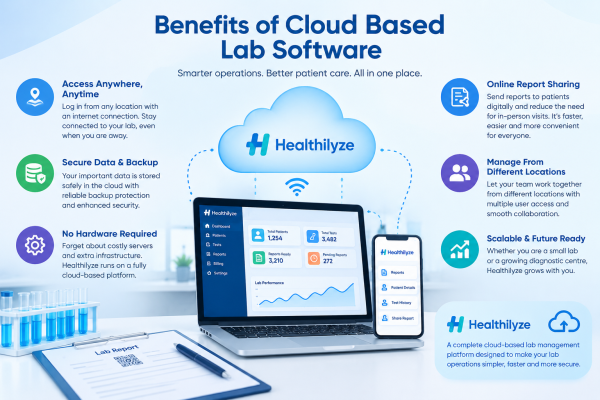
Another advantage is that you don’t necessarily need to maintain a separate local server just to run the software. Healthilyze, for example, is a cloud-based lab management platform with features such as cloud storage, backup protection, online report sharing, and access from different locations.
What Is Desktop Lab Software?
Desktop lab software is installed directly on a computer or a local network.
This type of software has been around for a long time, and many laboratories still use it. If a laboratory mainly works from one location and the software is installed on the computers used by the staff, it can be a practical option.
However, there is one thing to consider.
As the laboratory grows, the requirements may also change. You may want to access information from outside the lab, add another branch, allow more users to work on the system, or make reports available digitally.
This is where a desktop system can sometimes require additional setup or infrastructure.
Cloud vs Desktop Lab Software: What’s the Difference?
The difference isn’t simply about where the software is installed. It can affect how your laboratory works on a daily basis.
1. Access From Different Locations
This is one of the biggest differences.
With desktop software, you generally work from the computer or local network where the software has been installed.
With cloud based lab software, authorised users can access the system through the internet. This can be helpful for lab owners who want to check operations while they are away from the laboratory.
For example, if you are at home or visiting another branch, you may still need to check a report or look at laboratory information. Cloud access makes this type of situation easier.
2. Hardware Requirements
Desktop software usually depends more heavily on local computers and infrastructure.
Depending on the software, a laboratory may need to install the application on computers and maintain the local setup.
Cloud software can reduce this dependency. Healthilyze specifically lists “No Hardware Required” and “Fully VPS Cloud Base” among its features.
For smaller laboratories, avoiding unnecessary hardware can make the setup simpler.
3. Data Storage and Backup
Laboratory data is important. Patient details, test results, reports, and billing information should not be treated like ordinary files.
With a desktop system, the laboratory may need to take responsibility for local backups depending on how the software is configured.
Cloud-based software can provide centralised online storage and backup options.
Healthilyze provides cloud storage and backup protection as part of its platform. Its website also highlights data privacy and secure cloud storage for laboratory information.
Of course, laboratories should still check how any software provider handles security, access, backups, and data protection before choosing a system.
4. Software Updates
Desktop software may require updates to be installed on the computers where it is being used.
This may not be a major issue for a small laboratory, but it can become inconvenient when there are several computers or locations involved.
With cloud software, updates and system maintenance are generally handled as part of the online service. This means laboratory staff can spend less time worrying about the technical side of the software.
5. Sharing Reports With Patients
Today, patients don’t always want to visit the laboratory just to collect a report.
Many people prefer receiving their reports digitally.
This is another area where cloud-based systems can be useful.
Healthilyze allows laboratories to share reports online through channels such as WhatsApp, email, and SMS. Its workflow allows staff to add a case, enter the report details, save and lock the report, and then print or send it.
This can save time for both laboratory staff and patients.
Is Desktop Lab Software Still a Good Choice?
Yes, it can be.
There is no rule that says every laboratory must immediately move to cloud software.
A desktop system may still work well for a small laboratory that operates from a single location and does not need remote access.
The important thing is to think beyond your current requirements.
Maybe your laboratory has only a few staff members today. But what happens if the number of patients increases? What if you open another branch? What if you want the owner or manager to check the system remotely?
These are the questions worth asking before making a decision.
Why Are Laboratories Moving Toward Cloud Software?
One reason is convenience.
Laboratory staff already have enough work to do. They don’t want to spend extra time maintaining complicated systems, transferring files, or searching through different computers for information.
A cloud based lab software can bring many everyday activities together.
Patient information, cases, reports, billing, and other laboratory tasks can be managed through one system instead of being scattered across different places.
It can also make collaboration easier when multiple authorised users need to work with the same information.
For a growing laboratory, that flexibility can become increasingly valuable.
Healthilyze: A Cloud Based Lab Software for Everyday Laboratory Work
If you are looking for cloud based lab software, Healthilyze is one option worth exploring.
Healthilyze is designed to help diagnostic laboratories move their daily operations from manual processes to a more organised digital workflow.
The platform includes features for patient and case management, lab test management, report generation, billing, cloud storage, backup protection, and online report sharing. It is designed for both smaller labs and larger healthcare setups.
One thing that stands out is the focus on keeping the reporting process simple.
A staff member can add a new case, enter the required information, save and lock the report, and then print or send it digitally. Reports can be shared with patients through WhatsApp, email, or SMS.
This may sound like a small improvement, but these small improvements can make a difference when the same process is repeated dozens or hundreds of times.
Try Healthilyze Free for 7 Days
If you are unsure whether cloud software will actually suit your laboratory, you don’t have to make the decision based only on a feature list.
Healthilyze currently offers a free 7-day demo, giving laboratories an opportunity to explore the software before choosing a paid plan. The website also provides an option to book a personalised demo and see how the software works.
This can be particularly useful for lab owners who want to see the system in action before changing their existing workflow.
You can explore the basic features, understand how reports are managed, and see whether the platform feels suitable for your staff.
Sometimes, trying the software yourself is the easiest way to know whether it is the right fit.
Which Lab Software Should You Choose?
There isn’t one answer that will work for every laboratory.
If your laboratory is small, operates from one location, and is comfortable with a local computer-based system, desktop software may continue to work for you.
But if you want easier access, cloud storage, digital report sharing, less dependence on local hardware, and more flexibility as your laboratory grows, cloud based lab software may be a better option.
Before choosing any software, look at your actual workflow.
Ask yourself:
- How many people will use the software?
- Do we need access outside the laboratory?
- How do we currently back up our data?
- How do we send reports to patients?
- Will we add another branch in the future?
- Is the software easy enough for our staff to learn?
These questions will give you a much better idea of what your laboratory actually needs.
Final Thoughts
The choice between cloud and desktop lab software ultimately comes down to how your laboratory works today and how you expect it to grow in the future.
Desktop software can still be useful for laboratories that prefer a local setup. But cloud based lab software offers more flexibility when it comes to remote access, online storage, report sharing, and managing laboratory operations from different locations.
For laboratories considering a move to the cloud, Healthilyze provides a practical way to explore the benefits without making an immediate long-term commitment. With a free 7-day demo, cloud-based access, report management, digital sharing, and other lab management features, you can try the platform and see how it fits into your day-to-day work.
Rather than choosing software simply because it has a long list of features, choose something that makes everyday laboratory work easier for your team.
For More Information: www.Healthilyze.com
Follow us on Instagram: https://www.instagram.com/healthilyze/
Check Software Here: https://healthilyze.in/
Frequently Asked Questions
1. What is cloud based lab software?
Cloud based lab software is a laboratory management system that works through the internet. It allows authorised users to manage laboratory information, reports, patient records, billing, and other activities without relying entirely on a single local computer.
2. Is cloud lab software better than desktop software?
It depends on the laboratory. Desktop software can be suitable for labs that mainly work from one location. Cloud software may be more suitable for laboratories that need remote access, online storage, digital report sharing, or flexibility as they grow.
3. Can cloud based lab software be used by small laboratories?
Yes. Cloud software can be useful for small laboratories because it can reduce the need for local infrastructure and provide several laboratory management functions through one platform. Healthilyze states that its software is suitable for both small and large laboratories.
4. Does Healthilyze offer a free trial or demo?
Yes. Healthilyze currently lists a free 7-day demo and also provides an option to book a personalised software demo. This allows laboratories to explore the platform before choosing a paid plan.
5. Can Healthilyze send reports online?
Yes. Healthilyze supports online report sharing through WhatsApp, email, and SMS. This allows laboratories to send reports digitally instead of relying only on printed copies.
 Previous Post
 Next Post