

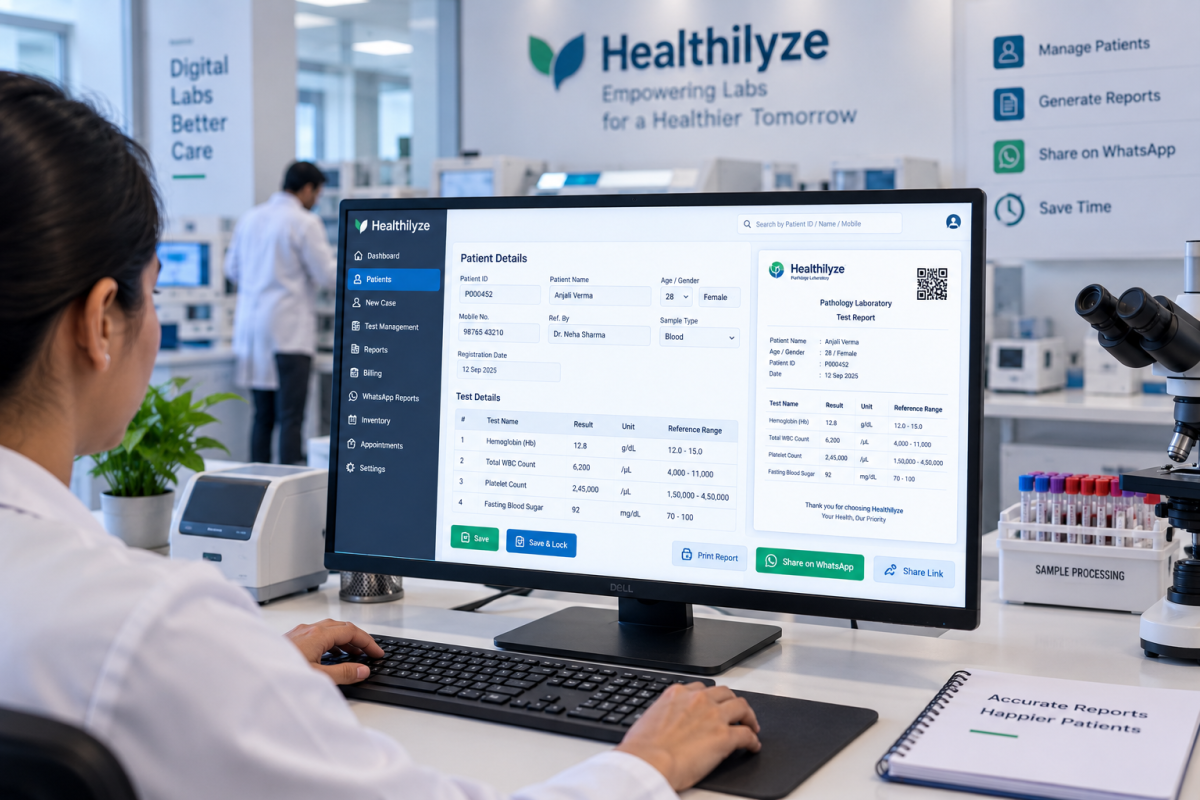
Running a diagnostic laboratory involves many tasks beyond performing medical tests. Staff may need to register patients, add test details, enter results, prepare reports, manage billing, store records, and send reports to patients.
When these activities are handled manually, they can take a lot of time. As the number of patients increases, managing paper files, registers, spreadsheets, and different tools can become difficult.
One area where laboratories can simplify their daily work is report preparation. Laboratory report automation software helps move repeated reporting tasks into a more organised digital process.
Instead of preparing every report from the beginning, staff can manage patient cases, enter test results, save reports, and share completed reports through one system.
What Is Laboratory Report Automation Software?
Laboratory report automation software is a digital system that helps laboratories prepare, manage, store, and share patient reports more efficiently.
In a traditional setup, staff may need to enter patient information, record test results, prepare a report, check the details, print it, and provide it to the patient. This may be manageable when there are only a few cases.
However, a busy laboratory may handle dozens or hundreds of cases in a day. Repeating the same steps for every patient can use valuable working hours.
Laboratory reporting software brings these activities into a digital workflow. Patient information and test details can be managed through the system, while completed reports can be printed or shared digitally.
The purpose of automation is not to replace laboratory staff. It is to reduce repetitive administrative work and make everyday reporting easier to manage.
Why Manual Report Preparation Can Be Difficult
Manual reporting can work for a small laboratory, but problems may increase as the workload grows.
Staff may have to enter similar information repeatedly, search through older records, prepare multiple reports, manage billing, and answer patients asking about their reports.
Some common challenges include:
- Repeated data entry
- More time spent preparing reports
- Difficulty finding older records
- Risk of typing mistakes
- Large amounts of paperwork
- Delays in sharing reports
- Difficulty managing many patient cases
- Using separate tools for different tasks
A digital laboratory reporting system can help organise these activities and reduce unnecessary steps.
How Laboratory Report Automation Works
One of the main advantages of laboratory report automation software is a more organised reporting workflow.
Without dedicated software, staff may need to move between registers, spreadsheets, paper files, billing records, and messaging applications.
A simple digital workflow can look like this:
Add Case → Enter Results → Save & Lock → Print or Send Report
Healthilyze follows a simple reporting process. A new case is added, report details are entered and saved, and the completed report can then be printed or shared digitally.
Having a clear process can make it easier for staff to understand what needs to be done at each stage.
Faster and More Organised Report Preparation
Preparing reports manually can involve several repeated steps. When the same type of information needs to be entered again and again, the process can become slower.
Laboratory report automation software can reduce some of this repetitive work by keeping patient and test information within a digital system.
Healthilyze allows users to add a case, enter report values, save and lock the report, and then print or send it.
The exact amount of time saved will depend on the laboratory’s workload and workflow. However, reducing repeated steps can make daily reporting easier to handle.
Digital Report Sharing
Preparing a report is only one part of the process. Once the report is completed, it also needs to reach the patient.
Traditionally, patients may have had to visit the laboratory again to collect a printed report. Digital report sharing gives laboratories another option.
Healthilyze supports report sharing through WhatsApp and also provides an option to print reports when a physical copy is required. Reports can also be shared through a secure link on supported devices.
This can be convenient for patients who cannot immediately return to the laboratory to collect their reports.
For laboratories, digital sharing can also reduce the need to print every report and make the communication process simpler.
Store Laboratory Reports Digitally
Finding an old report can be difficult when records are stored mainly in paper files.
For example, a patient may return after several months and ask for a previous report. Searching through physical files can take time, particularly when a laboratory handles many cases.
Cloud-based laboratory software provides a more organised way to store and access laboratory information.
Healthilyze is a cloud-based lab management system that provides cloud storage for laboratory data and reports. Its features also include backup protection and controlled access.
Keeping information in one digital system can make it easier for authorised staff to find records when needed and reduce dependence on physical paperwork.
More Than Just Report Management
Laboratory reporting is connected with many other activities. A single patient case may involve registration, testing, reporting, billing, payment tracking, record management, and communication.
Using separate tools for each activity can create additional work.
This is why it can be useful to choose laboratory software that combines different lab management functions.
Healthilyze includes features for:
- Patient cases
- Lab tests
- Test groups
- Report management
- Billing
- Payments
- Cloud storage
- Digital report sharing
Managing these activities through one platform can help laboratories keep their daily work more organised.
Who Can Use Laboratory Report Automation Software?
Laboratory report automation software can be useful for different types of diagnostic and healthcare setups.
It may be suitable for:
- Pathology laboratories
- Diagnostic laboratories
- Small independent labs
- Clinics with laboratory services
- Hospital laboratories
- Growing laboratories
The right software depends on the laboratory’s size, number of users, reporting requirements, and daily workload.
A small laboratory may mainly need patient and report management, while a larger laboratory may require additional features such as multiple-user access, billing, and record management.
Healthilyze is designed to support smaller laboratories as well as growing healthcare setups, with role-based access for different staff members.
What to Check Before Choosing Lab Reporting Software
Every laboratory has its own workflow. Before choosing laboratory reporting software, it is useful to check whether the system includes the features your staff actually need.
Simple Report Creation
Report creation should be easy to understand. A complicated system can make daily work harder, especially when staff are handling many cases.
Cloud-Based Access
Cloud-based software can allow authorised users to access laboratory information from different locations with an internet connection.
Digital Report Sharing
Check whether reports can be shared digitally as well as printed. This gives laboratories more flexibility when providing reports to patients.
Data Backup
Laboratory records are important. Backup features can provide an additional way to protect stored information.
User Access
When several people work in a laboratory, role-based access can help give users access according to their responsibilities.
Billing and Payment Management
Software that also supports billing and payment management can reduce the need to maintain separate records for these activities.
Why Healthilyze Can Help With Laboratory Reporting
Healthilyze is a cloud-based lab management software designed to bring everyday laboratory activities into one platform.
Its reporting workflow allows users to add a case, enter and save report details, and then print or send the completed report.
The software also supports WhatsApp report sharing, cloud storage, backup protection, lab test management, report management, and billing-related functions.
According to the Healthilyze website, the software is designed to be easy to use and does not require additional hardware. Laboratories can also explore the system through a 7-day free demo before choosing a plan.
For laboratories looking to move away from repetitive manual reporting, a digital system can provide a more organised way to manage cases and reports.
Final Thoughts
Laboratory reporting is an important part of daily lab operations. Manual reporting may be manageable with a small workload, but repeated data entry, paper records, report preparation, and manual sharing can become difficult as a laboratory grows.
Laboratory report automation software can help organise the reporting process, reduce repetitive work, manage records digitally, and make report sharing more convenient.
When choosing software, laboratories should focus on their actual requirements. Features such as report creation, cloud storage, digital sharing, backup, user access, test management, billing, and patient records can help determine whether a system fits the laboratory’s workflow.
Frequently Asked Questions
1. What is laboratory report automation software?
Laboratory report automation software is a digital system that helps laboratories prepare, manage, store, and share patient reports with less manual work. It can make reporting more organised and reduce repetitive data entry.
2. How does laboratory report automation software save time?
It can reduce repeated tasks such as entering patient information, preparing reports, searching for records, and sharing completed reports. This can make the daily reporting process easier to manage.
3. Can lab reports be shared digitally?
Yes. Laboratory software can provide digital report-sharing options. Healthilyze supports sharing reports through WhatsApp and secure links, along with the option to print reports when a physical copy is needed.
4. Is laboratory report automation software suitable for small labs?
Yes. Small laboratories can use digital laboratory software to organise patient records, manage reports, handle billing, and reduce paperwork. It can also become useful as the laboratory’s workload grows.
5. What should I look for in laboratory reporting software?
Look for features such as simple report creation, cloud storage, data backup, digital report sharing, patient and test management, billing, and user access controls. The software should be easy for your staff to use and fit your existing workflow.
 Previous Post
 Next Post