

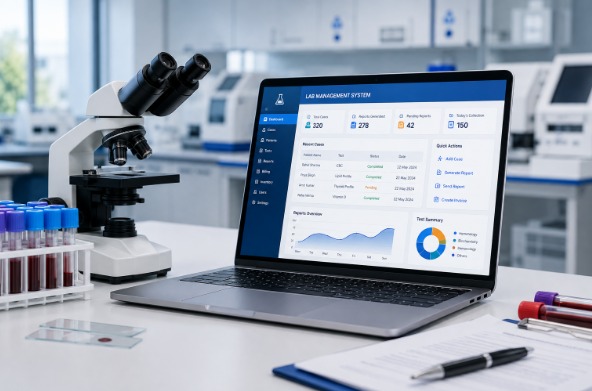
Running a pathology lab today means managing far more than just test results. From patient records and report generation to billing and staff coordination, every part of the workflow needs to move fast and stay accurate. That’s why more labs across India are moving away from manual registers and switching to dedicated pathology laboratory software. If you’re evaluating options for your lab, here’s what you need to know before you choose one.
Why Every Pathology Lab Needs Dedicated Software
Manual processes might work for a very small setup, but as patient volume grows, so does the risk of errors, delays, and lost records. A proper laboratory information system solves this by centralizing everything — case entry, report generation, billing, and communication — into one secure platform.
Good pathology software should help your lab:
- Reduce manual errors in report generation
- Speed up turnaround time between sample entry and report delivery
- Keep patient data secure and organized
- Simplify billing and payment tracking
- Give staff role-based access to the system
If your current setup, or the pathology lab software you’re considering, doesn’t cover these basics, it’s not going to save you time in the long run.
Key Features to Look for in Pathology Lab Management Software
Not all laboratory management systems are built the same. When comparing options, look closely at these core capabilities:
- Case Management and Reporting :- The best pathology reporting software should let you add a case, enter results, and generate a report in just a few steps — without switching between multiple tools.
- Secure, Cloud-Based Access :- An online pathology lab software solution means your team can access patient data and reports from anywhere, without depending on a single desktop or physical server.
- Billing and Payment Tracking :- Look for pathology billing software features built directly into the platform, so invoices, payments, and reports live in one place instead of separate spreadsheets.
- Data Privacy and Backup :- Since you’re handling sensitive patient health information, your pathology information system must include strong data protection, regular backups, and controlled access.
- Fast Report Sharing :- Modern patients expect quick results. The right pathology report software should support instant sharing via WhatsApp, SMS, or email — not just printed copies.
Healthilyze: A Complete Pathology Laboratory Management System
Healthilyze is built specifically to bring all of this together in one platform. It’s a cloud-based pathology laboratory management system designed for diagnostic labs of every size — from single-technician clinics to multi-specialty hospital labs.
Here’s what makes Healthilyze one of the best pathology lab software choices available today:
- Simple 3-Step Workflow — Add Case, Save & Lock, then Print & Send the report
- Run Anywhere, Anytime — fully cloud-based with no hardware requirements
- WhatsApp Report Sharing — send secure report links directly to patients
- Integrated Billing — manage payments and invoices within the same system
- 100% Data Privacy — advanced protection for patient and financial records
- Role-Based Access — separate permissions for lab owners, technicians, and reception staff
- Lifetime Free Updates and 24/7 Guaranteed Support
- Affordable Plans — starting with a free 7-day demo, then flexible monthly and annual pricing
Whether you’re searching for a simple pathology management software to get started, or a complete laboratory information system to scale your operations, Healthilyze covers both ends of that journey on a single platform.
Choosing the Right Pathology Software for Your Lab Size
- Small or new labs:- Start with a free demo to test core case management and reporting before committing.
- Growing diagnostic centers:- Look for billing integration and multi-user roles to support a larger team.
- Multi-branch or hospital labs:- Prioritize cloud access, scalability, and dedicated support to manage higher volumes reliably.
Final Thoughts
Choosing the right pathology laboratory software isn’t just about digitizing paperwork — it’s about building a system your lab can rely on every single day. Healthilyze combines reporting, billing, data security, and support into one platform, making it a strong choice whether you’re just starting out or ready to scale.
Book your free demo today and see how Healthilyze can simplify your lab’s daily operations.
Frequently Asked Questions
What is pathology laboratory software used for?
Pathology laboratory software helps labs manage patient case records, generate accurate test reports, handle billing, and share results digitally — replacing manual, paper-based workflows.
What’s the difference between a laboratory information system and pathology reporting software?
A laboratory information system (LIS) manages the full lab workflow, including patient data, samples, and reporting. Pathology reporting software specifically focuses on generating and formatting test reports. Healthilyze combines both functions in one platform.
Is online pathology lab software secure for patient data?
Yes, when built properly. Healthilyze uses cloud-based storage with data privacy protections and controlled, role-based access to keep patient records safe.
Can pathology lab software handle billing as well as reporting?
Yes. Healthilyze includes integrated pathology billing software features, so labs can manage invoices and payments alongside case reports in the same system.
Which pathology lab management software is best for a small lab just starting out?
For small or new labs, Healthilyze is a strong option — it offers a free 7-day demo, requires no hardware, and scales smoothly into paid plans as the lab grows.
 Previous Post
 Next Post